
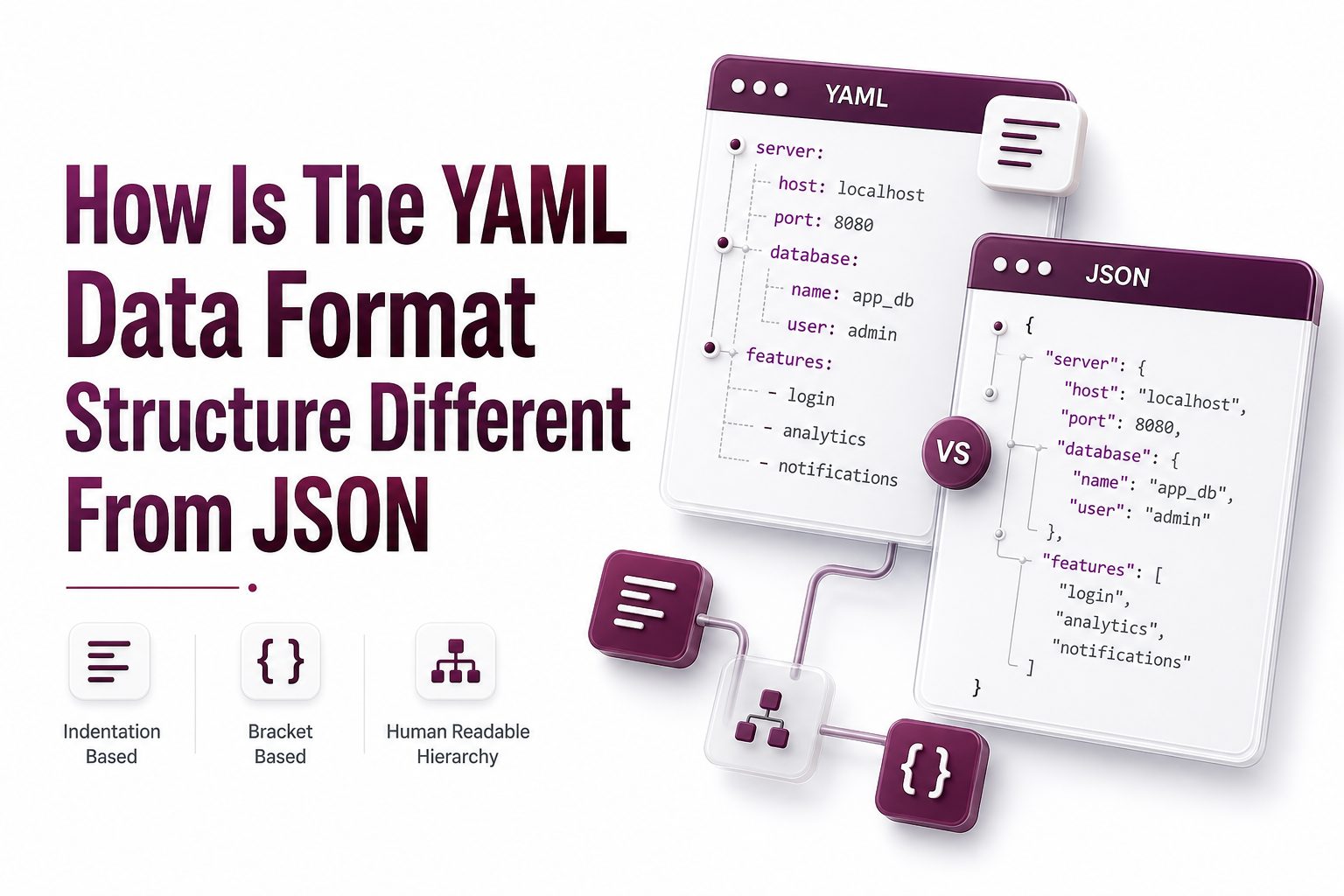
YAML and JSON are both data serialization formats used to store and exchange structured information. Developers rely on them for configuration files, APIs, automation tools, cloud deployments, and application settings across many modern software environments.
The main difference is how each format presents structure. JSON uses braces, brackets, quotes, and commas to define data clearly. YAML uses indentation, line breaks, and a more human-readable style that often looks closer to plain notes.
Both formats can represent objects, arrays, strings, numbers, booleans, and null values. The right choice depends on whether the data is meant for machines, people editing configuration files, or systems that need strict predictable parsing.
Core Structural Difference Between YAML and JSON
JSON structure is explicit. Objects are wrapped in curly braces, arrays use square brackets, and every key-value pair follows a fixed syntax. This makes JSON easy for software to parse and validate consistently across programming languages.
YAML structure is indentation-based. It removes many punctuation marks and uses spaces to show nesting. This creates cleaner-looking files, especially for configuration, but it also makes spacing accuracy more important during editing.
The keyword how is the yaml data format structure different from json usually points to this core contrast. JSON is punctuation-driven and strict, while YAML is whitespace-driven and flexible, with a stronger focus on readability for humans.
Key Structural Traits at a Glance
- JSON uses curly braces for objects and square brackets for arrays.
- YAML uses indentation and hyphens to define nested data and lists.
- JSON requires quoted keys and string values in standard syntax.
- YAML often allows unquoted strings unless special characters are involved.
- JSON does not support comments in its official format.
- YAML supports comments, making it useful for documented configuration files.
- JSON is commonly used in APIs and web data exchange.
- YAML is widely used in DevOps, CI pipelines, Kubernetes, and application configuration.
Syntax and Readability
JSON is compact and predictable, which makes it suitable for transmitting data between applications. Its syntax leaves little room for interpretation because punctuation clearly marks where each object, array, and value begins or ends.
YAML is easier to read when files are long or deeply nested. It avoids visual clutter by replacing braces and brackets with indentation. This style helps writers, DevOps engineers, and developers scan configuration values faster.
For readers who need related background, see our JSON data format guide for a closer look at JSON syntax rules, object structure, and common usage patterns in APIs and application development.
Indentation and Nesting
YAML depends heavily on indentation to express hierarchy. A child value is placed under its parent with consistent spacing. This makes nested configuration look clean, but one incorrect space can change meaning or cause a parser error.
JSON nesting is shown with braces and brackets instead of indentation. While developers often format JSON with spaces for readability, those spaces are not structurally meaningful. The punctuation carries the actual relationship between values.
This difference affects collaboration. YAML files can be pleasant to read in code reviews, yet they require careful formatting discipline. JSON can look busier, but its structure remains clear even when minified into a single line.
Objects and Key-Value Pairs
JSON objects contain key-value pairs inside curly braces. Each key is written as a quoted string, followed by a colon and a value. Commas separate each pair, which keeps the format strict and consistent.
YAML also uses key-value pairs, but without braces in most common cases. A key is followed by a colon, then the value. Nested keys appear on following indented lines, producing a clean document-like structure.
In JSON, a missing comma or quote breaks the file. In YAML, the most common issues come from uneven indentation, accidental tabs, or ambiguous values. Each format has different error patterns based on its structural rules.
Arrays and Lists
JSON arrays are enclosed in square brackets. Values are separated by commas, and each item can be a string, number, object, array, boolean, or null. This design is concise and works well for data exchange.
YAML lists commonly use hyphens at the start of each item. The list can contain simple values or nested objects. This layout is especially readable when each list item has several properties or related settings.
For example, a JSON list may feel efficient inside API responses. A YAML list may feel clearer inside a deployment file where each item represents a service, container, environment variable, permission, or workflow step.
Comments and Documentation
One major practical difference is comment support. JSON does not allow comments in the official standard. This keeps JSON clean for machine exchange, but it limits its usefulness for files that humans must explain and maintain.
YAML supports comments using the hash symbol. Teams can add notes above fields, explain valid values, or document why a setting exists. This makes YAML attractive for configuration files that need long-term maintenance.
For a deeper configuration comparison, see our YAML configuration best practices guide, which covers comments, indentation, environment-specific files, and review-friendly formatting patterns for production systems.
Data Types and Value Handling
JSON supports a small set of data types: object, array, string, number, boolean, and null. This simplicity helps keep parsing consistent. Most programming languages can map JSON values directly into native data structures.
YAML supports those same basic ideas but also provides richer typing behavior. Depending on the parser and YAML version, values such as dates, timestamps, and certain words may be interpreted as specific data types.
This flexibility can help in configuration, but it can also create surprises. A value that looks like a string may be parsed differently unless quoted. JSON avoids many of these issues by requiring more explicit syntax.
Strictness and Parser Behavior
JSON is strict by design. A valid JSON document must follow exact rules for quotes, commas, brackets, and values. This strictness makes JSON reliable when data moves between services, browsers, servers, and databases.
YAML is more flexible, which makes it comfortable for people but more complex for parsers. Different YAML versions and libraries may handle edge cases differently, especially around booleans, dates, anchors, aliases, and special characters.
In practice, JSON is often better when consistency matters more than readability. YAML is often better when humans need to write, edit, and document configuration frequently, as long as teams use linters and formatting rules.
Common Use Cases
JSON dominates web APIs because it is lightweight, language-independent, and easy to parse in JavaScript and many other programming environments. REST APIs, GraphQL responses, package files, and frontend application data often use JSON.
YAML is common in infrastructure and DevOps tooling. Kubernetes manifests, Docker Compose files, GitHub Actions workflows, Ansible playbooks, and many CI/CD systems use YAML because configuration needs to stay readable and editable.
The format choice often follows the workflow. Data sent between programs usually fits JSON. Configuration read and updated by humans often fits YAML, especially when comments and multi-line readability are useful.
Error Risk and Maintainability
JSON errors usually come from missing commas, extra commas, missing quotes, or unbalanced brackets. These errors are often easy for validators to identify because JSON syntax is strict and the grammar is relatively small.
YAML errors often come from indentation, tabs, unexpected characters, or values being interpreted differently than intended. These issues can be harder to spot visually, especially in large files with several nested levels.
Maintainability depends on discipline. JSON benefits from strict formatting and broad tooling. YAML benefits from clear indentation rules, comments, naming consistency, and automated validation before changes reach production systems.
Human Editing Experience
YAML is generally friendlier for manual editing because it reads like structured notes. People can add comments, scan nested values, and adjust configuration without dealing with many braces, brackets, or repeated punctuation marks.
JSON is less natural for long manual configuration, but it is highly familiar to developers. Many editors provide strong JSON validation, formatting, schema support, and autocomplete, which reduces manual editing mistakes.
For non-developer teams, YAML may feel more approachable at first glance. For API developers and application engineers, JSON often feels faster because it maps directly to objects used in daily programming tasks.
Machine Processing and Performance
JSON is usually simpler and faster to parse because its grammar is smaller and stricter. Many languages include native JSON support, and countless optimized libraries exist for reading and writing JSON at scale.
YAML parsers handle a broader feature set, including comments, anchors, aliases, block strings, and multiple document structures. This added flexibility can introduce more processing complexity compared with basic JSON parsing.
For high-volume data transfer, JSON is usually the stronger fit. For configuration files loaded at startup or during deployment, YAML’s readability often matters more than raw parsing speed.
Security Considerations
JSON has a smaller feature set, which reduces the number of parser behaviors developers need to consider. It is still important to validate input, but JSON usually has fewer advanced features that can create unexpected behavior.
YAML requires extra care with parser settings. Some YAML libraries have historically supported features that can instantiate objects or process complex references. Safe parsing modes should be used when loading untrusted YAML content.
For trusted configuration files in controlled repositories, YAML is practical and common. For untrusted input from external users or public APIs, JSON is often easier to validate, restrict, and process safely.
When to Choose JSON
Choose JSON when data needs to move between systems quickly and consistently. It is ideal for APIs, frontend-backend communication, event payloads, logs, browser storage, and any environment where machine readability is the main concern.
JSON is also a strong choice when the data must be validated against a schema. JSON Schema support is mature, widely used, and helpful for enforcing data shape across teams, services, and applications.
If a file is generated by software more often than edited by humans, JSON is usually practical. It keeps structure explicit, reduces ambiguity, and works smoothly with automation pipelines and programming language libraries.
When to Choose YAML
Choose YAML when humans need to write and maintain configuration files. Its layout is cleaner for long nested settings, and comments help teams document decisions directly beside the values they affect.
YAML is also useful when configuration benefits from multi-line strings, grouped settings, and readable lists. This is why many deployment, automation, and infrastructure tools use YAML as their default configuration format.
Use YAML with guardrails. Add linting, schema validation where available, editor formatting, and clear team conventions. These practices reduce indentation mistakes and make YAML files easier to manage over time.
Practical Formatting Differences
A JSON file often looks dense because every object, array, key, and string has visible syntax markers. This helps machines and validators, but it can make large configuration files feel harder to scan manually.
A YAML file often looks cleaner because indentation replaces many punctuation marks. Lists, nested values, and comments are easier to read, especially when settings are arranged in logical groups with clear names.
The tradeoff is direct. JSON gives explicit structure through punctuation. YAML gives visual structure through spacing. Neither approach is universally better; each serves a different balance between machine precision and human readability.
Real-World Example Context
Imagine a deployment configuration with services, ports, environment variables, health checks, and secrets references. YAML can present these settings in a readable vertical layout, with comments explaining why each value exists.
Now imagine an API response returning customer records, product data, or analytics results. JSON fits better because applications can parse it quickly, transmit it compactly, and map it directly into code objects.
This is why both formats remain popular. They solve related problems from different angles. JSON is excellent for exchange. YAML is excellent for configuration. Many teams use both in the same software ecosystem.
Common Mistakes to Avoid
Do not choose YAML only because it looks cleaner. If the data is passed between services or accepted from outside users, JSON may provide simpler validation, fewer parsing surprises, and better interoperability.
Do not choose JSON for large manually maintained configuration just because it is strict. Without comments and with heavy punctuation, JSON configuration can become harder to explain and maintain as systems grow.
The best decision starts with ownership. If software mainly writes and reads the data, JSON is likely better. If people mainly edit and review the file, YAML often provides a better working experience.
Conclusion
YAML and JSON both represent structured data, but they use different design priorities. JSON relies on strict punctuation, quoted strings, and explicit object and array markers. YAML relies on indentation, clean layout, comments, and flexible human-readable formatting.
The main answer to how is the yaml data format structure different from json is that YAML uses whitespace and indentation to define structure, while JSON uses braces, brackets, commas, and quotes. This affects readability, validation, tooling, and error patterns.
JSON is usually best for APIs, machine-to-machine communication, and high-consistency data exchange. YAML is usually best for configuration files, DevOps workflows, and documents that people need to edit, review, and document over time.
FAQ
What is the biggest difference between YAML and JSON
The biggest difference is structural style. JSON uses braces, brackets, quotes, and commas to define data. YAML uses indentation, line breaks, and hyphens, which makes it cleaner for human-edited configuration files.
Is YAML easier to read than JSON
YAML is often easier to read for long configuration files because it removes much of the punctuation used in JSON. Its indentation-based layout helps people scan nested settings, lists, and comments more naturally.
Is JSON better for APIs than YAML
JSON is usually better for APIs because it is compact, strict, and widely supported across browsers, servers, and programming languages. It is easy to parse and works well for fast machine-to-machine data exchange.
Can JSON and YAML store the same data
Yes, both formats can store objects, lists, strings, numbers, booleans, and null values. YAML can represent most JSON-like structures, while also adding features such as comments, multi-line strings, and richer formatting options.
Why do DevOps tools often use YAML
DevOps tools often use YAML because configuration files need to be readable, editable, and documented by people. YAML supports comments and clean nesting, which helps teams manage deployment, automation, and infrastructure settings.
0 Comments